
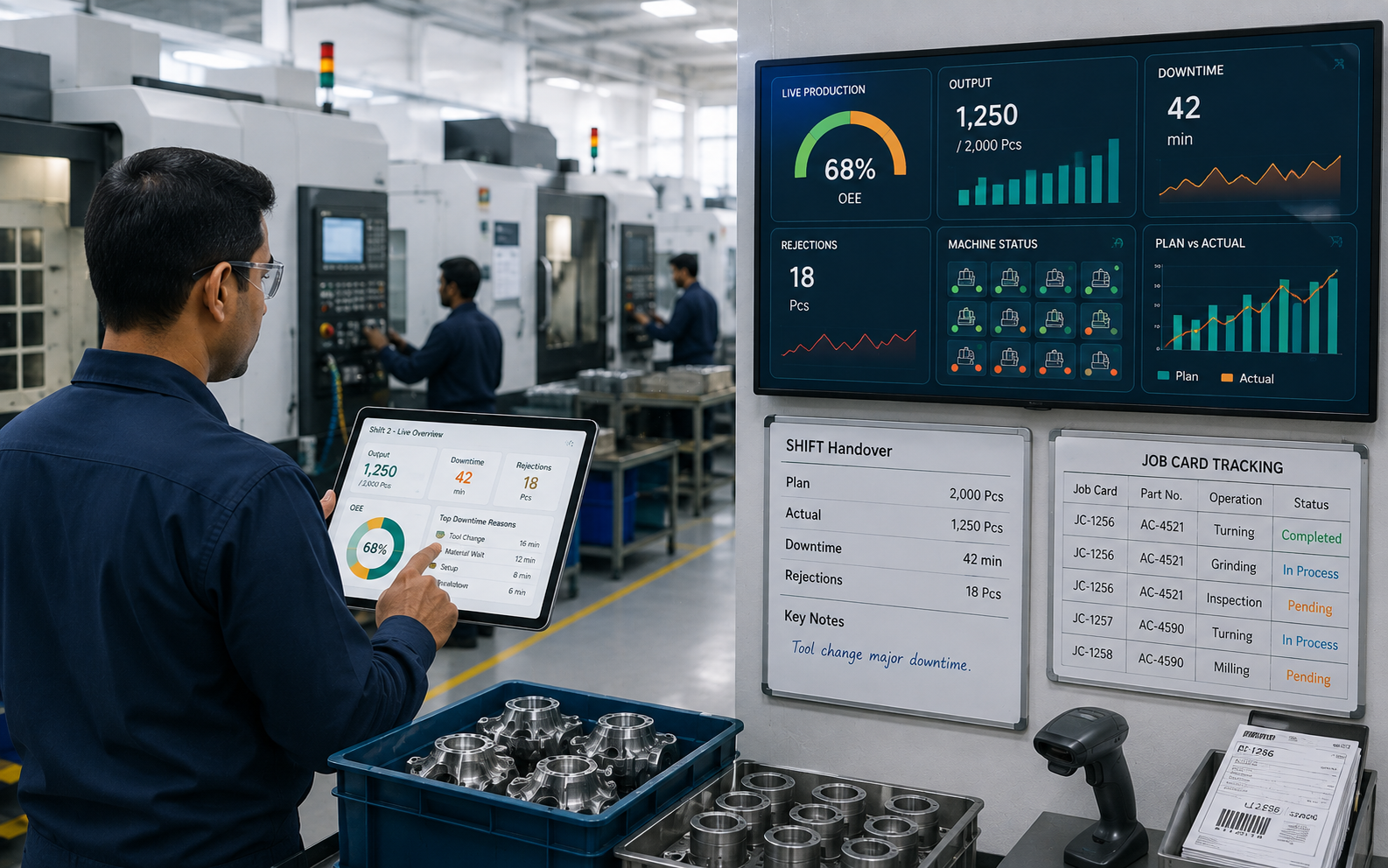
Production tracking software records what happens at every machine and turns it into a number your plant head can act on inside the same shift. Most plants already hold that data. They just receive it too late to change the outcome.
The cost of that delay is measurable. Deloitte estimates unplanned downtime costs industrial manufacturers an estimated $50 billion each year, and finds that weak maintenance practice alone can reduce a plant's overall productive capacity by between 5 and 20 percent.
For Indian component suppliers the stakes have moved with the sector. ACMA puts industry turnover at Rs. 6.73 lakh crore (USD 80.2 billion) in FY25, growing at a 14% CAGR since FY20, with supplies to OEMs up 10%.
Before you look at any product, sit with these three questions:
- Can you tell a customer right now which shift ran the batch they are disputing, without opening a physical file?
- When a machine stops for forty minutes, does someone record the reason at that moment, or is it reconstructed at month end?
- If your MD asked for yesterday's plan versus actual by part number, how many phone calls would that take?
If those answers made you uncomfortable, you are the reader this article is written for. What follows covers what production tracking software actually does, the one decision that determines whether your rollout works, and how plants in the Pune belt put it in without stopping the line.
TL;DR
|
· Production tracking software fixes timing, not paperwork volume. Your data already exists, it just arrives too late. · Most failed rollouts start by connecting machines, when the bigger loss sits in unrecorded manual events like setup, tool change and material wait. · Reason codes only work when they use your supervisor's words, not a vendor's dropdown. · Operators abandon any screen that takes longer than the paper sheet it replaced. · A tracking system that cannot reproduce a batch history during an audit is a dashboard, not a record. · The first 90 days should cover one line completely, not the whole plant partially. |
What Is Production Tracking Software?
Production tracking software is a system that records production events as they happen and shows them as live output, downtime and rejection numbers. It replaces the handwritten log sheet with a screen entry or an automatic machine reading.
The point of it is speed of knowing. At Edhaas Digisoft we build these systems around the log sheet a plant already uses, so an entry made at 11 PM is visible to the plant head at 11:01 PM instead of the next morning.
Production tracking vs production monitoring
These two get mixed up often. Monitoring watches machine state, meaning running, idle or stopped. Tracking follows the job, meaning which part, which operator, which batch, at which stage.
Where the job card fits
The job card is the paper record that travels with a batch. Production tracking software turns that card into a digital record that updates at every operation, which is what makes plan versus actual possible at part level.
Knowing the definition is easy. Knowing which features matter for a 60-person machining shop is where most buying decisions go wrong, so that comes next.
Core Features of Production Tracking Software
Every vendor lists roughly the same five capabilities. The difference shows up in what each one looks like on an Indian MSME floor with mixed-vintage machines and three shifts.
|
Feature |
What it does |
What it looks like on an MSME floor |
|
Real-time machine and line monitoring |
Shows live running, idle and stopped status per machine |
One screen near the supervisor's desk showing all 14 machines, colour coded |
|
Work order and WIP tracking |
Follows each job through operations and shows where stock is sitting |
Scanning a batch card at turning, grinding and inspection so nothing goes missing between stages |
|
Automated downtime and scrap categorisation |
Groups every stop and reject under a named reason |
Operator taps "tool change" or "material wait" on a tablet instead of writing it later from memory |
|
Digital work instructions and quality checks |
Puts the drawing, setting sheet and check frequency on screen |
An inspection entry that will not submit until the required dimension is filled |
|
ERP and MES integration |
Pushes production numbers into the system that raises invoices |
Tally or ERP receiving confirmed dispatch quantities without anyone re-typing them |
Those five are table stakes. What separates a system that survives contact with your shop floor is how the data gets in, which is worth walking through step by step.
How Production Tracking Software Works on Your Shop Floor
The mechanism is simpler than most product pages make it sound. Every production tracking system, from the cheapest to the costliest, does the same five things in order.
The key steps involved are:
|
1. Identify |
2. Record |
3. Classify |
4. Roll up |
5. Push out |
|
Scan the batch card |
Cycle, stop or reject |
Name the reason |
Plan vs actual, OEE |
Screen, phone, ERP |
Figure 1. The same five stages run on paper too. The difference is that the paper route completes at end of shift and becomes visible the next morning.
Step 3 is where most systems quietly fail. If the reason list was written by a software vendor, your supervisor will pick whatever sits nearest to true, and your downtime analysis becomes fiction within six months.
Is your quality data ready for an audit or scattered across notebooks?
Tell us what your plant records look like today. We'll show you what the digital version looks like mapped to your process, not a template.
Machine Monitoring or Manual Work-Order Tracking? Answer This First
Google's own AI Overview for this keyword ends by asking the reader a question: is your primary goal machine monitoring, or manual work-order tracking? That is the right question, and almost no vendor page answers it.
It matters because the two need different money, different hardware and a different rollout order. Choosing wrong is the most common reason an MSME tracking project stalls after the pilot.
|
Machine monitoring first |
Work-order tracking first |
|
|
Best when |
High-volume repetitive running on CNC or press lines |
Mixed models, frequent changeovers, high manual content |
|
Data comes from |
PLC signals, sensors, edge gateways |
Operator entry, barcode scans, tablets |
|
Hardware cost |
Per machine, and older machines need retrofit |
Shared tablets or a few fixed terminals |
|
Answers |
Is the machine running, and at what rate |
Where is my batch, who ran it, why was it late |
|
Blind spot |
Setup, tool change, material wait, rework, inspection queues |
Actual spindle rate and micro-stops |
|
Time to first useful number |
Longer, gated by wiring and retrofit |
Shorter, gated by operator habit |
Here is the part that gets skipped. In a mixed-model component plant, a large share of lost time never touches a machine signal at all, because it happens while the machine is legitimately stopped for setup, waiting for material, or waiting for an inspection sign-off.
That hidden loss is expensive, and maintenance practice is a big part of it. It is also why production tracking pairs naturally with preventive maintenance software once the first line is live.

So the sequencing advice is unglamorous. Track the job first and connect the machines second, because job-level tracking pays back faster and tells you exactly which machines are worth wiring.
The Shift-2 Test: Five Questions Before You Spend Anything
We run this with every plant before quoting anything, and it takes about a minute. It measures the only thing that matters, which is how fast a fact travels from the machine to a decision.
Score one point for each yes, answering honestly about last week rather than about a good week.
|
THE SHIFT-2 TEST 1. Before shift 3 starts, does the plant head know shift 2's output by part number, without asking anyone? 2. Is every stop longer than ten minutes recorded with a named reason, on the same day? 3. Can you retrieve the full history of any dispatched batch in under five minutes? 4. Does the rejection number on the shop floor match the rejection number in the MIS? 5. If the supervisor is on leave, does the shift report still come out correctly? Score 0 to 2: Your problem is data collection, not analytics. Start with job-level tracking. Score 3 to 4: Your data is fine, your rollup is manual. Start with dashboards and ERP integration. Score 5: You do not need production tracking software. You need machine-level rate analysis. |
|
"The Indian auto component industry continues to exhibit remarkable resilience and growth. With OEM sales, exports and the aftermarket segments all growing positively, the industry clocked a turnover of Rs. 6.73 lakh crore (USD 80.2 billion) in FY25, reflecting a growth of 9.6% over the previous fiscal." Vinnie Mehta, Director General, ACMA ACMA Industry Performance Review, FY2024-25 |
Growth at that pace changes what a customer expects from a supplier's records. Which brings us to what you should actually be checking when you evaluate a system.
What to Look For in Production Tracking Software
Most buying guides for this category rank vendors. That is the wrong output for an MSME, because the right answer depends on your machines, your model mix and your customer's documentation demands. These five checks are more useful than any ranking.
1. It works with the machines you already own
Ask the vendor what happens with your oldest machine, by name and vintage. A system that needs every machine retrofitted before it produces a number is a capital project, not a tracking project.
2. An operator can finish an entry in under a minute
Time it during the demo, with an actual operator, not a salesperson. If the screen takes longer than the paper sheet it replaces, entries drift to end of shift and your live data quietly dies.
3. The reason codes use your words
Your supervisor says "insert change" and "power cut", not "unscheduled maintenance event". Reason lists must be editable by your own team, in your own language, or the downtime analysis will not survive a year.
4. It produces a record an auditor accepts
IATF 16949 certified suppliers have to show identification and traceability across production stages, with records retained. A tracking screen that cannot reproduce batch traceability records on demand fails the one test that carries commercial consequences.
5. Your data stays exportable and yours
Ask where the database sits, who owns it, and how you get everything out if you leave. That single question separates a long-term partner from a subscription trap.
|
"The fiscal year witnessed broad-based growth and recovery across segments... the industry continues to show remarkable resilience and remains in robust health. Investments in higher value-addition, technology upgradation, and localisation are being accelerated to align with evolving customer expectations and global supply chain dynamics." Shradha Suri Marwah, President, ACMA and CMD, Subros, commenting on FY25 turnover of Rs. 6.73 lakh crore (USD 80.2 billion), up 9.6% year on year. ACMA Industry Performance Review, FY2024-25 |

Passing all five checks still leaves the hardest part, which is getting the system live while the plant keeps shipping.
Rolling Out Production Tracking Software Without Stopping the Line
Buying is not the hard part. Research on Indian small enterprises points straight at this gap: the India SME Forum's 2025 study found that 47.7% of enterprises find the setup and day-to-day use of digital platforms challenging, and describes the sector's defining hurdle as an implementation gap rather than a shortage of tools.

That is why we sequence rollouts in narrow slices. A 90-day plan that covers one line completely beats a 12-month plan that covers the plant partially.
|
Window |
What happens |
What proves it worked |
|
Days 1 to 15 |
Map, do not build. Walk the line, photograph existing log sheets, write down every reason your supervisor gives for a stop. |
You have a reason code list in your team's own words |
|
Days 16 to 45 |
One line, one shift. Run the paper sheet in parallel. |
The digital numbers match the paper numbers |
|
Days 46 to 70 |
All shifts on that line. Night shift is the real test. |
Entries hold at 2 AM without a supervisor standing there |
|
Days 71 to 90 |
Connect and extend. Push confirmed numbers into ERP, add the management dashboard for the MD. |
The MD stops calling the plant for numbers |
Plants that follow this order tend to keep the system. Plants that go plant-wide from day one usually end up with a screen nobody looks at and paper still running underneath it.
Is your quality data ready for an audit or scattered across notebooks?
Tell us what your plant records look like today. We'll show you what the digital version looks like mapped to your process, not a template.
Why Should You Choose Edhaas Digisoft for Production Tracking Software?
Auto component plants do not run identical processes, so identical software rarely fits. Your setting sheets, your reason codes and your inspection sign-offs are specific to your line. We map those first and build the production management system to match, instead of asking your team to work the way a product expects.
What we build:
- Live plan versus actual, OEE, downtime and rejection views drawn from your existing log sheet format
- Barcode and QR scanning with machine and IoT data, for auto component manufacturers running mixed models
- ERP and Tally integration, role-based access and full audit trails across batch traceability and quality management records
What it has changed on real floors:
- Cycle time: 40% improvement in production cycle time after log sheet automation
- Dispute handling: a disputed batch verified in minutes, confirming the scrapped items
- Record integrity: zero missing records, with audit-ready documentation
We are founder-led, based in Pune, and working across Chakan, Ranjangaon and Pimpri-Chinchwad, which means we are on your floor when something needs fixing after go-live. See how this played out in our production dashboard case study.
|
Ready to see shift 2 before shift 3 starts? Schedule a Consultation |
Conclusion
Production tracking software earns its place when it shortens the distance between a machine event and a management decision. For an auto component MSME that shows up as faster customer responses, cleaner audit files, fewer arguments about what shift 2 actually produced, and a rejection number your team trusts enough to act on.
Start narrow. Run the Shift-2 Test, pick job-level tracking or machine monitoring based on where your losses actually sit, prove it on one line for 90 days, and only then extend. That order is what separates a working system from an expensive screen.

Questions